22
Jun
A Beginner's Guide to AI-Powered Business Automation
Running a business involves many daily tasks. From answering emails and managing customer requests to organizing information and preparing reports, there is always something that needs attention.
But what if some of these tasks could be handled automatically?
This is where AI-powered business automation comes in.
AI-powered automation combines Artificial Intelligence with software tools to help businesses complete routine activities with less manual effort. It can make everyday work more organized, save valuable time, and help teams focus on more important responsibilities.
In this beginner-friendly guide, we will explain what AI-powered business automation is, how it works, and how businesses can start using it.
What Is AI-Powered Business Automation?
Business automation means using software to perform tasks that would otherwise require manual work.
Artificial Intelligence adds another level of capability. It can help software understand information, recognize patterns, generate responses, and support decisions.
For example, a traditional automation system might send an automatic email whenever someone fills out a contact form.
An AI-powered system could go further by understanding the message, identifying its purpose, and helping prepare a relevant response.
The goal is simple: make business processes easier and more efficient.
1. How Does AI Automation Work?
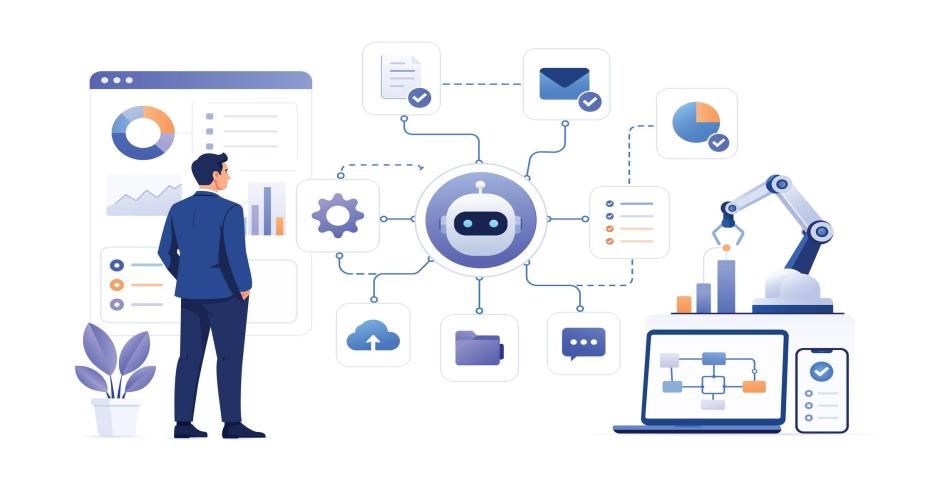
AI automation works by connecting different software tools and creating workflows that perform specific tasks.
A workflow usually follows a simple process:
Step 1: Receive Information
A system receives information from a website form, email, document, or another connected application.
Step 2: Understand the Information
An AI tool can analyze the information and identify what needs to be done.
Step 3: Perform an Action
The automation system carries out an assigned task, such as organizing information, preparing a response, or updating a record.
Step 4: Review the Result
The output can be checked by a team member before it is used or shared.
Not every workflow needs AI. Sometimes simple automation is enough. The right approach depends on the task.
2. Everyday Business Tasks You Can Automate
AI-powered automation can support many different business activities.
Here are some practical examples.
Email Management
Businesses receive emails throughout the day. Some contain questions, others include requests, and many require similar responses.
Automation tools can help sort incoming emails, identify common topics, and prepare response drafts.
This can make email management more organized.
Customer Support
AI assistants can help answer frequently asked questions and guide website visitors toward useful information.
For example, a customer might ask about a company's services or how to contact its support team.
An AI assistant can provide relevant information when it has been configured with accurate company details.
Document Organization
Many businesses work with invoices, forms, reports, and other documents.
AI tools can help extract information, summarize documents, and organize files into suitable categories.
This can reduce some of the manual work involved in document management.
Appointment Reminders
Businesses can use automation to send reminders about scheduled meetings, appointments, and important activities.
This helps keep communication organized and reduces the need for manual follow-ups.
Content Preparation
AI writing tools can help prepare blog outlines, draft emails, create product descriptions, and organize content ideas.
A person should always review the final material to ensure accuracy and maintain the right brand voice.
3. Benefits of AI-Powered Automation
When used correctly, AI automation can offer several practical benefits.
Save Time
Routine activities can take less manual effort, allowing teams to focus on other responsibilities.
Improve Organization
Automated workflows can help keep information, tasks, and communication organized.
Reduce Repetitive Work
Tasks that follow predictable patterns can often be handled through automation.
Support Faster Communication
AI assistants and automated workflows can help businesses respond to common requests more efficiently.
Improve Productivity
When everyday processes become easier to manage, teams can spend more time on planning, creativity, and customer relationships.
These benefits depend on the quality of the tools, the workflow design, and how the system is used.
4. How Small Businesses Can Get Started
You do not need to automate your entire business from the beginning.
A better approach is to start with one simple task.
Here are five steps to help you get started.
Step 1: Identify Repetitive Tasks
Look at your daily activities and find tasks that take time but follow a similar process.
Step 2: Choose a Suitable Tool
Find an AI or automation tool that matches your requirements.
Step 3: Create a Simple Workflow
Start with a basic process, such as organizing contact form submissions or preparing email drafts.
Step 4: Test the Workflow
Check whether the automation works correctly. Review its output and look for mistakes.
Step 5: Improve Gradually
Once the workflow works well, consider adding more steps or connecting other tools.
Starting small makes it easier to understand what works for your business.
5. AI Automation vs Traditional Automation
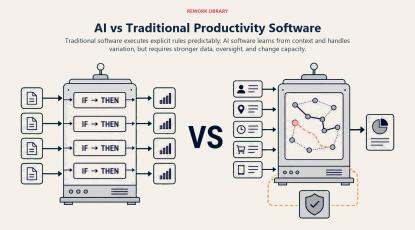
Both AI automation and traditional automation can help businesses reduce manual work, but they work differently.
Traditional automation follows predefined rules. It is useful for predictable tasks where the instructions are already known.
AI automation can also work with information that requires interpretation, such as written messages, documents, and natural language.
For example:
Traditional automation can send an email after a form is submitted.
AI automation can help understand the form message and prepare a suitable response.
Traditional automation can move a file into a selected folder.
AI automation can help identify the document type before organizing it.
In many cases, combining both approaches creates a useful workflow.
6. Things to Consider Before Using AI Automation
AI automation can be helpful, but businesses should plan carefully before using it.
Data Privacy: Protect customer and business information. Use tools with appropriate privacy and security controls.
Accuracy: AI systems can make mistakes. Review important information before taking action.
Human Supervision: Keep people involved in important decisions and customer interactions.
Tool Compatibility: Check whether your selected tools can connect with your existing software.
Costs: Understand subscription fees, usage limits, and maintenance requirements.
Good automation is not about removing people from every process. It is about helping people work more effectively.
7. The Future of Business Automation
AI technology is developing quickly, and automation tools are becoming more accessible to businesses of different sizes.
In the future, businesses may be able to connect more of their everyday applications, manage complex workflows more easily, and use AI assistants for a wider range of tasks.
However, technology alone does not guarantee better results.
Businesses will still need clear processes, suitable tools, reliable information, and human oversight.
The most useful automation solutions will be the ones that solve real problems and make everyday work simpler.
Final Thoughts
AI-powered business automation is becoming an important part of modern business operations.
It can help simplify repetitive tasks, organize information, support customer communication, and improve everyday workflows.
The best way to begin is to identify one task that takes too much time and explore how suitable software can make it easier.
At Japocode, we focus on AI software, digital tools, and business automation solutions. We believe technology should be practical, easy to understand, and useful in everyday business life.
Japocode — Smarter Technology. Simpler Business.
Share
Latest blogs